返回文章列表
146 字
· 1 分钟
react-redux工作流程
流程图大概如下
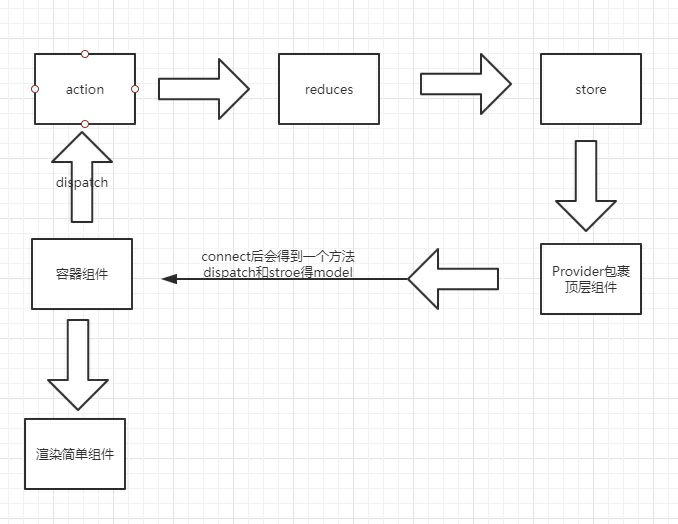
下面看一下,每一步如何实现
1.action和reduces的关系
action.js
export function addTodo(text) {
  return {
    type: "add.todo",
    text
  };
}
reduces.js
function todos(state = [], action) {
  i++;
  console.log("action", action);
  if (action.type === "add.todo") {
    return [...state, { text: action.text, index: i }];
  } else if (action.type === "toggle.todo") {
    return state;
  }
  return state;
}
通过action.type来控制如何操作state,reduces里面就是具体的实现
2.reduces和store的关系
reduces.js 把所有的reduces合并到一起,准备放到store里面
const todoApp = combineReducers({
  todos: todos,
  visibilityFilter: visibilityFilter
});
export default todoApp;
外层的组件 index.js
import React from "react";
import ReactDOM from "react-dom";
import { Provider } from "react-redux";
import { createStore } from "redux";
import todoApp from "./reducers";
import App from "./App";
import "./styles.css";

let store = createStore(todoApp);

function Root() {
  return (
    <Provider store={store}>
      <div className="App">
        <App />
      </div>
    </Provider>
  );
}

const rootElement = document.getElementById("root");
ReactDOM.render(<Root />, rootElement);注意let store = createStore(todoApp); 和 Provider
3.某容器组件
import React, { Component } from "react";
import { connect } from "react-redux";
import { addTodo } from "../actions";

class AddTodo extends Component {
  handleAdd = () => {
    let value = this.input.value;
    this.props.dispatch(addTodo(value));
    this.input.value = "";
  };
  render() {
    return (
      <div>
        <h2>AddTodo</h2>
        <>
          <input ref={e => (this.input = e)} />
          <button onClick={this.handleAdd}>添加</button>
        </>
      </div>
    );
  }
}
export default connect(({ todos }) => ({ todos }))(AddTodo);
connect 后会得到 todos 的数据和dispatch方法
在线示例 https://codesandbox.io/embed/react-redux-exemple-kx0zl
评论
无需注册,填写昵称即可评论 · 阅读 — 次